Airbnb Pricing Strategy 2026: One Complete Operator System
TL;DR
This is the one canonical pricing procedure on this site. It sets a base rate, bounds it with a cost floor and a demand ceiling, then layers booking-window, seasonal, event, orphan-night, and minimum-stay rules on top of that anchor.
Where a claim describes how Airbnb behaves, it is cited to Airbnb's own Help Center and dated. Where a claim is Sean's operating rule, it is labeled as his method and the portfolio it came from. Revenue-lift percentages you cannot verify for your own listing have been removed rather than repeated.
Three approaches cover every market you will meet: Top-Down Reductive for predictable demand, Pace for real-time signal, and Battleship when you have no data at all. A weekly and monthly review cadence, a change log, and a failure-diagnosis ladder keep the system honest after launch. By Sean Rakidzich, 155-property operator. Strategy session at rakidzich.com/book.
Key Facts
| Variable | What It Controls | Common Mistake |
|---|---|---|
| Base Price | Your floor. The minimum acceptable nightly rate. | Setting it too low to attract bookings. Training guests to expect discounts. |
| Demand Multiplier | How much you charge above base on high-demand nights. | Not raising prices enough during events, weekends, and peak seasons. |
| Gap Fill Price | Lower rate to fill orphan nights between bookings. | Leaving 1-2 night gaps at base price that never fill. |
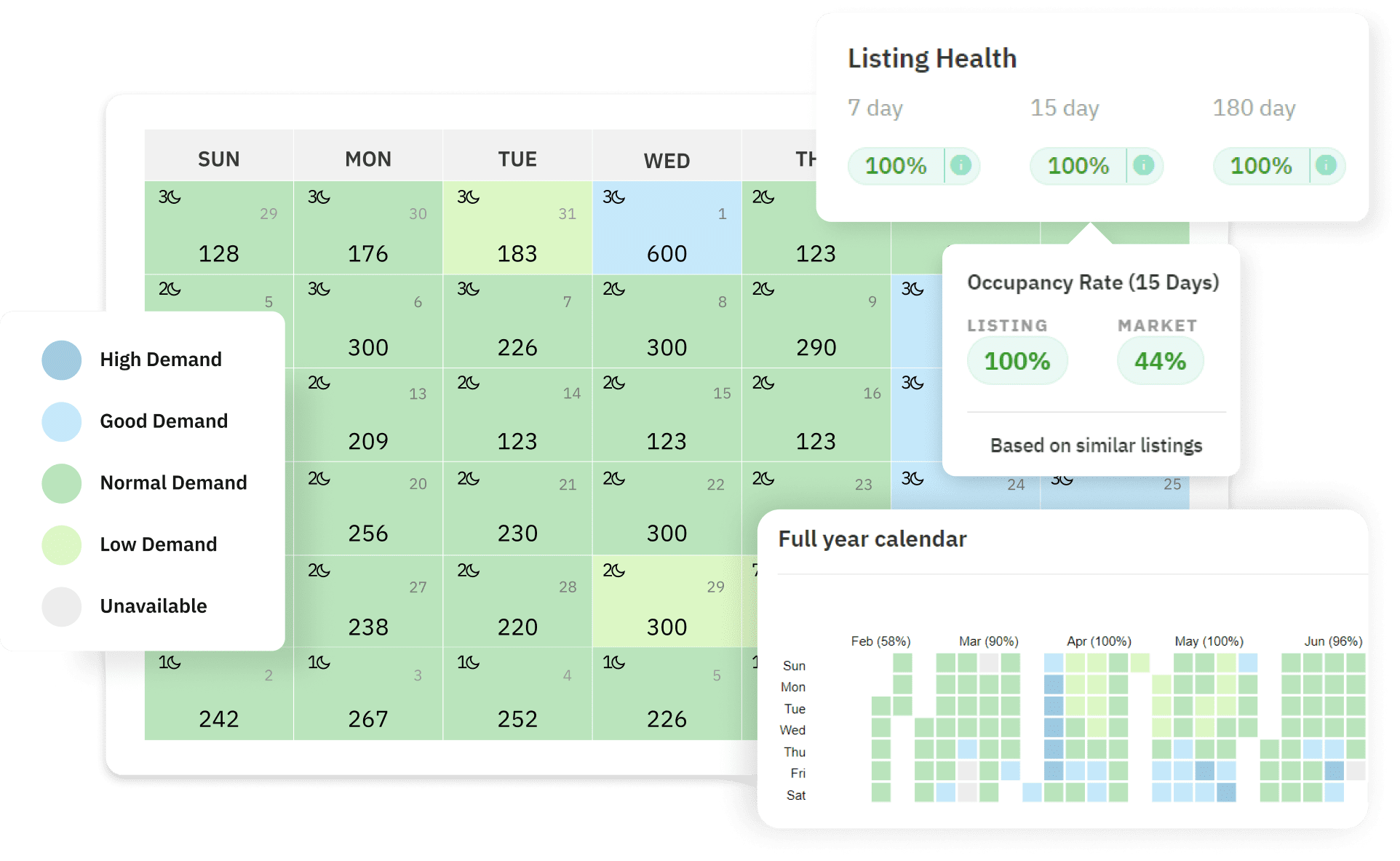
Image via PriceLabs
Key Takeaways
- Why Most Airbnb Hosts Leave Money on the Table Every Night
- How Sean Learned to Think About Pricing
- The Three Pricing Variables That Drive STR Revenue
- Approach 1: The Top-Down Reductive Strategy
- How to Set Your Airbnb Base Price
- Weekend and Seasonal Pricing Adjustments
- Approach 2: The Pace Strategy
Verified Platform and Tool Facts
Each item below was read directly from the vendor's own documentation on . Airbnb changes these controls without notice, so re-check the linked page before you act on it.
- Airbnb applies rule-set pricing in a fixed order: nightly and weekend pricing first, then length-of-stay discounts, then early-bird and last-minute discounts. When a trip qualifies for two length-based discounts, only the larger one is applied. — Airbnb Help Center, How rule-sets work
- The cleaning fee and the Airbnb service fee are added after your rule-set price is calculated, not before. Your discount percentages therefore never apply to those fees. — Airbnb Help Center, How rule-sets work
- Smart Pricing adjusts your nightly price within a minimum and maximum range you set, using Airbnb's demand signals. Weekly, monthly, and trip-length discounts override it, and you must turn it off entirely to use weekend pricing or a rule-set. — Airbnb Help Center, Use Smart Pricing
- PriceLabs Dynamic Pricing lists at $19.99 USD per listing per month plus tax for the US, UK, Canada, Europe, Australia, New Zealand, and Israel, and $9.99 for the rest of the world. Their own calculator quotes $14.49 per listing per month at ten listings. A 1% of booking revenue plan is offered as an alternative to per-listing pricing. — PriceLabs Pricing Plans
Free Airbnb pricing strategy guide. Sean Rakidzich explains base pricing, demand multipliers, dynamic tools, and the metrics that actually drive STR revenue across 100+ properties.
- RevPAN (Revenue Per Available Night) is the metric that matters, not occupancy rate.
- Three pricing approaches give you full control: Top-Down Reductive (start high, drop with reason), Pace (adjust based on booking speed), and Battleship (hunt for the right price when you have no data).
- Set base price at market median for established listings. Price 10-15% below for new listings building reviews.
- Event weekends justify 100-300% above base. Check your market calendar every Monday.
- PriceLabs is the recommended dynamic pricing tool. Airbnb Smart Pricing optimizes for occupancy, not revenue.
- Length-of-stay discounts (10-15% weekly, 25-30% monthly) attract lower-maintenance guests with longer stays.
- Review RevPAN, ADR, lead time, and booking length distribution monthly. Adjust one thing each time.

Sean Rakidzich Airbnb Pricing Strategy
Why Most Airbnb Hosts Leave Money on the Table Every Night
Open your Airbnb calendar. What do you see? White squares. Rows and rows of white squares stretching out for months. Sean Rakidzich calls this the "fog of war." You do not know which nights will book. You do not know at what price. All you see is uncertainty.
The average host responds to that fog by picking one price and leaving it alone for months. Maybe they bump it up for holidays. But they never think about Thursday versus Sunday pricing. They never adjust for events. They never consider the demand curve 90 days out.
Sean has built and managed a portfolio of 100+ properties across 8 cities. His conclusion from that portfolio is that a priced calendar beats a flat one, consistently enough that he runs no property on a flat rate. What that is worth on your listing depends on your market, your seasonality, and how far off your current pricing is, and nobody can quote you a percentage without seeing your numbers. Treat any specific revenue-lift figure you read anywhere, including here, as unverified unless it comes with a method you can reproduce.
This guide gives you three approaches to clear the fog. Each one works in a different situation. Together, they cover every market and every scenario you will face as a host.
THE CORE INSIGHT
Pricing is not about being cheap enough to fill your calendar. It is about being expensive enough to maximize what you earn on the nights you do fill. Occupancy and revenue are not the same goal.
How Sean Learned to Think About Pricing
Before Airbnb, Sean sold newspaper subscriptions door to door. He quickly learned something that changed how he thought about money. Rich neighborhoods would pay more for the same subscription. Lower-income neighborhoods paid less. Same product. Different prices. The market set the price, not the cost of the newspaper.
When he started hosting on Airbnb at the end of 2014, he applied that same logic. His first question was simple. "If dates are not selling at the listed price, why not just drop them?"
In his first two months as a host, Sean was already dropping prices last minute to stay full. The result? He hit 90%+ occupancy from day one. His lifetime occupancy average across all properties sits at 89%. That number includes the COVID-19 pandemic.
During COVID, when most hosts went dark, Sean picked up the phone. He cold-called businesses to find relocation liaisons, project managers, and HR departments who needed housing for traveling workers. He filled his spaces while others sat empty.
"No one should ever go half empty ever."
That mindset shaped everything Sean teaches about pricing. For him to make money with an average property, it was always about finding the market. Not waiting for the market to find him.
THE PRICING MINDSET
Sean's background in direct sales taught him one rule that most hosts ignore. The price is not what you want to charge. The price is what the market will pay at that moment in time. Your job is to find that number for every single night on your calendar.
The Pricing Control Model: Three Layers, Never Mixed
Most pricing advice fails because it mixes three different jobs into one instruction. "Use PriceLabs" is not a strategy. "Raise prices for events" is not a tool setting. Separating the layers is what makes a pricing system debuggable when it stops working.
| Layer | What it decides | How often it changes | Where it lives |
|---|---|---|---|
| Strategy | Your floor, your ceiling, your target position against the market, and which of the three approaches you are running | Quarterly, or when the market structurally shifts | Your own notes. Not in any tool. |
| Execution | The actual number on each of the next 365 nights | Daily, mostly automatic | Airbnb rule-sets, Smart Pricing, or a third-party tool |
| Diagnosis | Whether the first two layers are working, and which one to change when they are not | Weekly review, monthly deep review | Your change log |
The practical value of the split shows up when revenue drops. If your calendar goes quiet, the question is not "what price should I set." The question is which layer broke. A strategy fault means your floor or your market position is wrong. An execution fault means the tool is doing something you did not intend. A diagnosis fault means you have been changing things without recording what you changed, so you cannot tell which move caused what.
THE CORE SEPARATION
Strategy sets the bounds. Execution fills in the numbers between them. Diagnosis tells you which one to touch. A host who cannot say which layer they are editing is guessing, no matter how sophisticated the tool is.
The Three Pricing Variables That Drive STR Revenue
Every short-term rental pricing decision comes down to three variables. Master all three and you will outperform every flat-rate host in your market.
| Variable | What It Controls | Common Mistake |
|---|---|---|
| Base Price | Your floor. The minimum acceptable nightly rate. | Setting it too low to attract bookings. Training guests to expect discounts. |
| Demand Multiplier | How much you charge above base on high-demand nights. | Not raising prices enough during events, weekends, and peak seasons. |
| Gap Fill Price | Lower rate to fill orphan nights between bookings. | Leaving 1-2 night gaps at base price that never fill. |
Base price should be set based on your market's median comparable listing, not your costs. Your costs do not matter to guests. Market rate is the only anchor that counts.
Demand multiplier requires you to know your market's event calendar. Sports events, conferences, concerts, and holidays all create demand spikes. You should be at 150-300% of base price during these windows.
Gap fill price is a tactical discount to convert orphan nights. A 2-night gap between bookings at 70% of base price is better than two empty nights at full base price.
Approach 1: The Top-Down Reductive Strategy
The Top-Down strategy is best for markets where demand is predictable. Think business-as-usual cities without massive event spikes. It works by starting high and dropping with reason.
HOW IT WORKS
Step 1: Find your peak season. Go to rabu.com and pull up the free seasonality chart for your market. It shows you which months have the strongest demand. These are your peak months.
Step 2: Research peak-season prices. Search Airbnb for properties that match yours during your peak season. Same guest count, same bedroom count, same general quality. Note what they charge per night.
Step 3: Set your entire calendar at peak prices. This is where most hosts get uncomfortable. You put every single date on your calendar at peak-season pricing. Weekday base price and weekend base price on Airbnb. Individual day prices on VRBO.
Step 4: Drop prices for three reasons only. Now you work your way down. You only lower a price when one of these three things is true:
- Seasonality. Lower-demand months get lower prices. Your seasonality chart tells you exactly which months those are.
- Shorter lead time. The less time you have before a night arrives, the less confident you should be that it will book. Less time equals lower price.
- Compromised calendar. As your calendar fills up, the remaining empty nights get fewer views from guests. Fewer views means you need a lower price to convert.
THE REVENUE EQUATION
One booking equals views times your conversion rate. If you get 100 views and convert at 1%, that is 1 booking. To fill 30 nights at an average stay of 3 nights, you need about 1,000 views. As your calendar fills, views drop. So prices should drop too. This is math, not guessing.
The one downside of Top-Down is that it does not capture surprise spikes. If Taylor Swift announces a concert in your city, the Top-Down approach alone will not catch it. You need the Pace strategy for that.
Required Inputs: The Numbers You Need Before You Price Anything
You cannot set a defensible price without five inputs. Four of them are about your own economics and one is about the market. Hosts who skip the first four end up with a price that looks competitive and loses money on every booking.
Fixed monthly cost. Rent or mortgage, utilities, internet, insurance, software subscriptions, and any recurring management fee. This is what the property costs you in a month with zero bookings.
Variable cost per stay. Cleaner pay, consumables, laundry, and restocking. This is charged per turnover, not per night, which is why it distorts short stays so badly.
Realistic booked nights per month. Not your target. What you actually booked last month, or a deliberately conservative estimate if the listing is new.
Your host service fee. Airbnb documents that your base price is your payout, which includes fees you charge and excludes the host service fee. Know which fee structure your account is on before you model anything.
Market midweek median. Eight to ten listings matching your bedroom count, guest capacity, and quality tier, priced on a midweek night about four weeks out. Four weeks out strips out both last-minute discounting and weekend distortion.
Computing your cost floor
Your cost floor is the nightly rate below which a booking makes you poorer than an empty night once you account for the turnover. The arithmetic is deliberately simple, and it is worth doing by hand once before you let any tool near your calendar.
THE FLOOR FORMULA
Cost floor per night = (fixed monthly cost ÷ realistic booked nights) + (variable cost per stay ÷ average nights per stay).
Worked: $2,400 fixed ÷ 20 booked nights = $120. Variable cost of $90 per turnover ÷ a 3-night average stay = $30. Cost floor = $150 per night. A $130 booking on this listing is a loss disguised as occupancy.
Two things about that number. First, it moves when your average stay length moves. A listing that shifts from 3-night to 5-night average stays drops its per-night turnover load from $30 to $18, which lowers the floor by $12 without any change in cost. That is the real financial argument for length-of-stay discounts, and it is more reliable than any revenue-lift claim.
Second, if your market median sits below your cost floor, no pricing strategy fixes that. You have a cost problem or an acquisition problem, and repricing will only change how fast you lose money. Sean's position across the portfolio is blunt: a deal that only works at above-market pricing is not a deal.
THE MOST COMMON FLOOR ERROR
Setting the minimum price in a dynamic pricing tool to a number that "feels low" rather than to the computed floor. The tool will find that number and book you there on slow nights. If your floor is $150 and your tool minimum is $95, you have authorized the software to lose money for you automatically.
How to Set Your Airbnb Base Price
Your base price is your foundation. Get this wrong and every other pricing decision is built on a bad assumption.
Step 1: Find your true comps. Search Airbnb for properties in your area with the same guest capacity, bedroom count, and amenity level. Note their prices on a random Tuesday (midweek, non-event) over the next 30 days.
Step 2: Find the market median. Average the prices of your 5 closest comps. This is your market's median midweek price.
Step 3: Position yourself. New listings (under 10 reviews) should price 10-15% below market median to build review velocity. Established listings with 4.8+ average should price at or slightly above median.
- Never use Airbnb's Smart Pricing suggestion as your base. It optimizes for bookings, not revenue.
- Review your base price every 30-60 days as comparable listings change.
- Track your booking rate. 85-90% occupancy means your base price is too low. Under 60% means it may be too high or your listing has issues.
- Account for your cleaning fee in the effective nightly rate. High cleaning fees can make short stays uncompetitive.
SEAN'S RULE
Do not copy the lowest price in your market. Copy the listing with the most reviews in your guest-capacity tier. They have already found what the market will bear.
Setting Your Ceiling: The Number Most Hosts Never Set
Almost every host eventually sets a floor. Very few set a ceiling, and the ones who do usually set it as a round number that means nothing. A ceiling is not a guess about the most you would like to earn. It is the highest price your listing has ever actually collected, plus a controlled test increment.
Where the ceiling comes from
Your ceiling is bounded by proof, not ambition, and three things move it:
- Your highest collected rate. The most anyone has ever paid you for one night. Not the most you have ever listed. The most you have ever been paid. That is a fact about your market's willingness to pay for your specific property.
- Review depth and rating. Sean's operating rule across the portfolio: a listing with a deep review count and a high rating can hold a higher ceiling than an identical listing next door with six reviews, because the guest is buying certainty as much as the room. Treat the size of that premium as something you measure on your own listing, not a fixed percentage you copy.
- Scarcity in the window. On a weekend where comparable inventory has sold out, your ceiling is temporarily much higher than your normal ceiling. This is the single largest ceiling-moving force, and it is why the event calendar matters more than any tool setting.
The ceiling test procedure
Record your highest collected nightly rate for the last 12 months. Note the date, the lead time, and whether it was an event window.
Set your tool's maximum to that number plus roughly 15%. You are giving the system permission to try above your proven ceiling, but not permission to price into fantasy.
Watch what happens on the next high-demand window. If a night books at the new maximum, your ceiling just moved. Record the new number.
If nothing books at the top of the range across two high-demand windows, hold the maximum where it is. You have found the current edge.
WHY A CEILING AT ALL
Two reasons. An uncapped tool can price you into an empty peak week on bad data, which costs you the most valuable nights on your calendar. And a listing that sits at an absurd price collects views without bookings, which is the worst signal you can send to a search algorithm that rewards conversion.
Weekend and Seasonal Pricing Adjustments
Demand is not flat. It spikes on weekends, during events, and in peak season. Hosts who fail to adjust for these patterns give money away.
| Time Period | Demand Level | Recommended Adjustment |
|---|---|---|
| Monday-Wednesday (midweek) | Lowest | Base price or slight discount for 3+ night minimum |
| Thursday night | Medium-high | 10-20% above base. Business travel plus weekend arrivals. |
| Friday-Saturday night | High | 25-50% above base in most markets |
| Sunday night | Low-medium | Base or slight discount. Many guests check out Sunday. |
| Local event weekends | Peak | 100-300% above base. Research your city event calendar. |
| Major holidays (NYE, July 4th, Thanksgiving) | Peak | 200-400% above base. Book out months in advance. |
| Peak tourist season | High | 20-40% above base for the full season |
| Off-peak or low season | Low | Reduce minimum stay. Consider 10-15% base reduction. |
Sean checks his market's event calendar every Monday. One missed event weekend can cost $1,000-$2,000 in underpriced bookings.
Approach 2: The Pace Strategy
Pace is the rate at which your dates are getting booked. It is the most powerful real-time signal you have for whether your prices are too high or too low.
THE HOTEL ANALOGY
Think about a hotel with 300 rooms. Two weekends are coming up. One weekend is booking at 10% of total rooms per day. The other is booking at 5% per day. The hotel raises prices on the fast weekend and lowers them on the slow one. That is pace-based pricing.
With one listing, you cannot track pace across your own inventory. Instead, you watch your competition. Open Airbnb and search your area with the same guest count. Check which listings were available last week and are now booked. That tells you how fast the market is moving.
HOW TO USE PACE
- Fast pace (dates booking quickly): Raise your prices. The market has more demand than supply right now.
- Slow pace (dates sitting empty): Lower your prices. You need to be booked first before the slow season gets worse.
- Reverse pace (market showing strength): If everything around you is filling up, raise your prices and try to be the last one booked. Guests who book late will pay a premium because they have fewer choices.
Wheelhouse has a pace section built into the tool. It shows you how quickly dates are getting booked across your market. PriceLabs also offers pace data.
THE SOFTWARE TRAP
Pricing software only adjusts based on data from paying members. As more hosts join the same software, the tool tries to balance the market so everyone gets booked. But if there are more hosts than demand, the software can push everyone's prices down. You need to watch the data yourself and be willing to deviate from the tool's suggestions.
THE WINNING SCENARIO
Picture this. A big weekend is coming. Every good listing in your area sells out. You are one of the only quality options left. Now a guest searches and finds your place at $500 per night. Their other option is a run-down place at $350. They book yours without blinking.
That is the power of pace. In strong markets, you want to be the last one booked, not the first. You earn more per night and attract guests who value quality over price.
Sean applies the "be booked first" mindset to the whole year, not just slow season. Any weekday or weekend, you might need to get booked first. The trick is knowing when to flip between "book first" and "book last."
Sean teaches his personal method for tracking Airbnb competition in his Cracking Superhost coaching program.
Booking-Window Pricing: The Same Night Is Worth Different Amounts
Two kinds of guests book your place. Planners book months ahead and are buying certainty. Procrastinators book within days and have fewer options left. The same Saturday is worth different amounts to each of them, and a single flat price serves neither well.
The mechanism underneath is inventory decay. A night is perishable. Once it passes unbooked, that revenue is gone permanently. So your confidence that a night will book should fall as the date approaches, and your price should fall with it. This is arithmetic, not pessimism.
| Window | Posture | Typical move | What you are watching |
|---|---|---|---|
| 90 to 60 days out | Hold high | Ceiling-side pricing. You have maximum time to find a better offer. | Whether any far-out bookings land at all |
| 60 to 30 days out | Hold, watch pace | Small reductions only if comparable listings are filling and you are not | Competitor fill rate for the same window |
| 30 to 14 days out | First real concession | Step down if the night is still open | Your own historical booking curve for this season |
| 14 to 7 days out | Convert | Larger step down. Most remaining demand books in this window. | Whether the step produced a booking within 48 hours |
| Inside 7 days | Floor discipline | Approach your floor, and stop there | Whether the booking still clears your cost floor |
Airbnb supports both ends of this natively. Early-bird discounts reduce the price for booking further in advance, and last-minute discounts reduce it as check-in approaches. Both are configured inside a rule-set, and both are applied after your nightly and weekend pricing, in that documented order.
THE LAST-MINUTE TRAP
An empty night earns nothing, so any booking looks better than none. That reasoning is what walks hosts below their floor. A booking at $110 against a $150 floor does not earn you $110. It costs you $40 plus a turnover you now have to service. Set the floor, then let the empty nights be empty when the number does not clear.
Dynamic Pricing Tools: When to Use Them and Which Ones Work
Dynamic pricing tools connect to your listing and adjust prices automatically based on demand signals. They are powerful, but they need setup and oversight.
PriceLabs is Sean's recommended tool. It gives operators granular control over pricing rule sets, market data integration, and minimum/maximum price floors. The monthly fee is small compared to the revenue upside.
Wheelhouse is a strong alternative with a cleaner interface. Better for hosts who want less configuration.
Airbnb Smart Pricing is built in and free. Airbnb documents that it adjusts your nightly price based on demand within a minimum and maximum you set. Airbnb does not publish what the algorithm optimizes for, so treat any claim about that as opinion. Sean's operating view is that it produces lower rates than he would set himself, which is why the portfolio does not rely on it alone. The constraint that matters most in practice is structural rather than philosophical: you must turn Smart Pricing off to use weekend pricing or a rule-set. See the control-interaction table above.
- Set a minimum price floor in any dynamic tool. Never let it price below your cost-to-operate.
- Set a maximum price cap for competitive sanity. Outlier pricing can hurt review quantity.
- Review the tool's suggestions weekly, especially for event periods where automated data may lag.
- Cross-reference the tool's signals by searching Airbnb directly. Filter by your guest count, browse pages 1-2 of results with flexible dates, and note what comparable listings charge. This gives you real-time data that reflects how the Airbnb algorithm currently ranks listings.
TOOL COST, CHECKED 2026-08-03
PriceLabs Dynamic Pricing lists at $19.99 per listing per month plus tax in the US, falling to $14.49 per listing per month at ten listings on their own calculator. They also offer a 1% of booking revenue plan as an alternative to per-listing pricing, which changes the arithmetic considerably for high-ADR properties.
Whether that fee pays for itself is a question you answer with your own numbers, not with a benchmark. Run the tool for one season, compare RevPAN against the prior comparable season, and keep or cancel on the result.
Approach 3: The Battleship Strategy (Zone-Based Pricing)
The Battleship strategy is for hosts who have no data. Maybe you are brand new to a market. Maybe you are the first good listing in your area. You have no comparable sales history and no pace data to work from. This is where Battleship comes in.
The name comes from the board game. You are "hunting" for the right price the same way you hunt for ships on a grid. You fire a shot (set a price), see if it hits (gets booked), and adjust from there.
THE PROCESS
- Set prices lower than you are comfortable with for the next 3 weeks. This feels wrong, but you need bookings to collect data.
- Every time you get booked, write it down. Record three things: the price, the lead time (how far out the guest booked), and whether it was a weekday or weekend.
- Each recorded booking becomes a "way point." If you got booked at $100 with 14 days of lead time, you now know one thing for certain. You can always get booked at $100 at 14 days out.
- After each booking, raise prices for dates farther out. If someone booked 14 days out at $100, try $120 at 30 days out. You are testing the ceiling.
- If you stop getting booked at a higher price, feather it back down. Drop in small steps until bookings start again. This is the "hunting" part.
LOWEST DOCUMENTED ATTEMPT
Here is a concept Sean developed. The Lowest Documented Attempt (LDA) is the lowest price you have ever tried to charge for a specific lead time that did NOT get booked.
Example. You charge $145 at 30 days out and get booked every single time. You try $150 at 30 days out and sometimes it books, sometimes it does not. Your LDA for 30-day lead time is $145. That is your floor. Whenever you just need a booking and nothing else matters, drop below your LDA. You will almost always fill the night.
GRADUATING TO ZONE-BASED PRICING
After a few weeks of Battleship, you will have enough way points to build zones. This is the advanced version of the strategy.
- 90-day zone: Dates 60-90 days out. Highest prices, most time to sell.
- 60-day zone: Dates 30-60 days out. Moderate prices. Start watching pace.
- 30-day zone: Dates 15-30 days out. Prices drop if pace is slow.
- 15-day zone: Dates within 15 days. Use your LDA as the floor.
Each zone has a "probability ladder." At the bottom is your guaranteed floor price (the price that always books). At the top is the highest price you have ever collected. Your job is to decide where on the ladder to sit based on pace, seasonality, competition, and lead time.
Example. A nice house with a pool and hot tub might have a guaranteed floor at 90 days of $275. That feels low for the property. But it proves the market. As data builds, the floor rises and the ceiling gets clearer.
COMBINE ALL THREE APPROACHES
The best pricing strategy is not one approach. It is all three layered together. Use Top-Down as your baseline. Layer in Pace for real-time adjustments. Use Battleship when you enter a new market or when the data is unclear. Sean teaches the full system, including his personal competition tracking method, in the Target Price course.
Length-of-Stay Discounts and Cleaning Fee Strategy
Two often-overlooked pricing levers can change your booking patterns and effective nightly rate: length-of-stay discounts and your cleaning fee structure.
Length-of-stay discounts attract the guests you actually want. These guests are lower-maintenance, create fewer turnovers, and bring more predictable revenue. Sean uses weekly discounts of 10-15% and monthly discounts of 25-30%.
Cleaning fee structure affects short-stay competitiveness. A $150 cleaning fee on a one-night booking makes your effective rate $150 higher than advertised. Guests see this and leave. You have options:
- Build cleaning cost into the nightly rate for short stays and reduce the cleaning fee you show.
- Set a higher cleaning fee and use minimum stay lengths that spread the cost over multiple nights.
- Offer a lower cleaning fee for stays of 5+ nights to attract extended bookings.
Calculate your actual cost-per-turnover (cleaner pay plus supplies plus your time). This is your cleaning fee floor.
Check your market. Search Airbnb for similar listings and note their cleaning fees. Outliers in either direction affect click-through rate.
Test a weekly discount of 10% for 7+ night stays. Track how it changes your average booking length.
Review your length-of-stay distribution monthly. If you are getting too many 1-night stays, raise your minimum to 2 nights.
Orphan Nights, Gap Days, and the Minimum-Stay Lever
An orphan night is a single empty night sitting between two bookings. A gap day is the same problem across two or three nights. Both are created by your own minimum-stay settings interacting with the shape of the bookings you already took, which means both are largely self-inflicted and largely fixable.
Why orphans form
If your minimum stay is 3 nights and a guest books Friday through Monday, the Tuesday and Wednesday before that booking become unreachable. No guest can book them, because the only stays that fit are shorter than your own minimum. You have priced them at whatever your rule says, but the number is irrelevant. The nights are structurally unbookable.
Find them weekly. Scan the next 60 days for any run of open nights shorter than your current minimum stay. Those are your orphans.
Drop the minimum on those specific dates. Airbnb lets you set trip-length requirements inside a rule-set, and custom pricing on a specific night overrides your default nightly price, Smart Pricing, weekend pricing, and long-term pricing for that night.
Price the orphan to clear the turnover, not the night. A one-night orphan still costs you a full cleaning. Its floor is higher than a normal night's floor, not lower.
Decide the walk-away. If the orphan cannot clear its own turnover cost at any price your market will pay, leave it empty. An unserviced empty night costs you nothing. A serviced unprofitable night costs you real money and real cleaner goodwill.
The minimum-stay tradeoff, stated honestly
| Minimum stay | What it buys | What it costs | Best fit |
|---|---|---|---|
| 1 night | Maximum bookable surface. No orphans can form. | Highest turnover load. Cleaning cost per revenue dollar is worst here. | Orphan gaps and high-ADR markets |
| 2 nights | Halves the turnover load with modest demand loss in most markets | Creates single-night orphans | The common default |
| 3 nights | Meaningfully lower cleaning burden and fewer guest interactions | Creates 1 and 2 night orphans, and excludes a real share of weekend demand | Peak season and event weekends |
| 5+ nights | Lowest operating load, most predictable revenue | Excludes most short-trip demand entirely | Low season, and mid-term positioning |
The honest version of this decision is that the right minimum stay is not a fixed setting. It is seasonal. Raising it during peak and lowering it during shoulder season is the whole technique, and doing it on a fixed weekly review is what separates it from guessing.
Tool Configuration Versus Operator Judgment
The boundary question is not which tool is best. It is which decisions you are willing to delegate. Get that boundary wrong and you will either micromanage a system that was working, or wake up to a peak weekend that a piece of software sold at a discount.
What the platform actually does, documented
Before delegating anything, it is worth knowing precisely how Airbnb's own controls interact, because the interactions are not intuitive and several of them are override relationships rather than additions. As documented in Airbnb's Help Center and verified on :
| Control | Documented behavior | What it overrides or conflicts with |
|---|---|---|
| Base price | Applies to all future nights you have not customized. Your base price is your payout, including fees you charge and excluding the host service fee. | Overridden by everything below it |
| Smart Pricing | Adjusts your nightly price based on demand, within a minimum and maximum you set | Must be turned off to use weekend pricing or to apply a rule-set. Weekly, monthly, and trip-length discounts override it. |
| Custom nightly price | Set on a specific night in your calendar | Overrides your default nightly price, Smart Pricing, weekend pricing, and long-term pricing for that night |
| Rule-sets | Nightly price adjustments, length-of-stay discounts, last-minute and early-bird discounts, trip-length requirements, check-in and checkout requirements | Overrides existing pricing and availability settings for those dates. Cannot run alongside Smart Pricing. |
THE OVERRIDE YOU WILL GET WRONG
Smart Pricing and rule-sets are mutually exclusive. You must turn Smart Pricing off to apply a rule-set. Hosts who configure a careful rule-set while Smart Pricing is still on are configuring something that is not running.
Where the automation ends
Sean's boundary across the 155-property portfolio, stated as a rule rather than a benchmark: delegate the recurring and the arithmetic, keep the exceptional and the local.
| Delegate to the tool | Keep as operator judgment |
|---|---|
| Day-of-week differentials | Whether an announced local event is actually a demand event for your property type |
| Gradual last-minute step-downs inside your floor | Where the floor sits, and when it moves |
| Seasonal curves you have already validated once | The first season in a market you have never operated in |
| Length-of-stay discount arithmetic | Whether to accept a below-floor booking for a strategic reason, such as a first review |
| Far-out pricing on ordinary dates | Peak dates worth more than a normal week of revenue |
A NOTE ON SMART PRICING, LABELED HONESTLY
Airbnb documents that Smart Pricing adjusts your price based on demand within your range. It does not publish what the algorithm optimizes for. Sean's operating view, from running the portfolio, is that leaving Smart Pricing on with a low minimum produces lower nightly rates than he would set himself, which is why the portfolio does not rely on it alone. Treat that as an operator judgment about his properties, not a documented platform fact about yours. The test is cheap: set a minimum you would actually accept, then compare a month against your own manual pricing.
Reading Your Pricing Data: What Metrics Actually Matter
Most hosts look at one number: occupancy rate. That is the wrong number to optimize. Here are the metrics Sean tracks across his portfolio:
- RevPAN (Revenue Per Available Night): Total monthly revenue divided by total available nights. This is your real performance metric. High occupancy with low nightly rates produces a low RevPAN.
- Average Daily Rate (ADR): Total revenue divided by booked nights. Compare this to what similar listings are charging by searching Airbnb directly.
- Booking lead time: How far in advance are guests booking? Long lead times signal you can raise prices for that window. Short lead times suggest your prices are being dropped too late.
- Length of stay distribution: Are you getting mostly 1-night, 3-night, or 7-night stays? Adjust minimums and discounts based on what your market actually books.
- Day-of-week performance: Which nights are filling first and which are the last to fill? Price your slow days lower before booking pressure builds.
MONTHLY REVIEW HABIT
Set a calendar reminder on the first of every month. Review your RevPAN, ADR, lead time, and booking length. Make one pricing adjustment. Track the result. This habit compounds over time.
What is the best Airbnb pricing strategy?
The best strategy combines dynamic pricing tools (PriceLabs, Beyond, or Wheelhouse) with manual rule sets. Set base rates using comparable listing analysis, then automate adjustments for demand, seasonality, day-of-week, and booking lead time. Key rules: price higher on weekends, discount for 7+ night stays to reduce turnover, and never set your minimum below your break-even cost. Sean Rakidzich uses this system across 155 properties.
Worked Example: One Listing, All the Way Through
Every rule above is easier to trust once you watch it produce a number. This example is fully specified so you can check the arithmetic. The listing is illustrative. The mechanics of how the discounts stack are taken directly from Airbnb's documented rule-set order.
Stated assumptions
- Two-bedroom unit, sleeps four. Fixed monthly cost of $2,400. Variable cost of $90 per turnover.
- Realistic booked nights per month: 20. Average stay length: 3 nights.
- Market midweek median from eight comparable listings, four weeks out: $185.
- Listing is established: 60+ reviews, high rating. Highest rate ever collected: $430 on a July event weekend.
- All figures are illustrative inputs, not measured market data for any specific city.
Step 1: the floor
$2,400 ÷ 20 booked nights = $120 per night of fixed cost. $90 turnover ÷ 3-night average stay = $30 per night of variable cost. Cost floor = $150 per night.
Step 2: the base
The market midweek median is $185, which is comfortably above the $150 floor, so the business model works before pricing does anything clever. Because the listing is established rather than new, it sits at the median rather than under it. Base = $185.
Step 3: the ceiling
The highest rate ever collected is $430. Add roughly 15% as a controlled test increment. Maximum = $495. The tool is now allowed to try above proven demand, but not to price into fantasy.
Step 4: what a guest actually pays
Now take a real booking and run it through Airbnb's documented order of operations. A guest books a 30-night stay, booking far enough ahead to qualify for an early-bird discount. The rule-set carries a 10% high-season nightly increase, a 20% early-bird discount, and a 30% monthly discount.
| Step | Rule applied | Running nightly rate |
|---|---|---|
| 1 | Base nightly price | $185.00 |
| 2 | Nightly and weekend pricing: +10% high season | $203.50 |
| 3 | Length-of-stay and booking-time discounts. The trip qualifies for both a 20% early-bird and a 30% monthly discount, so only the larger discount applies. | $142.45 |
| 4 | Cleaning fee and Airbnb service fee are added to the reservation total after this calculation | $142.45 nightly, plus fees |
WHAT THIS EXAMPLE EXPOSES
$142.45 is below the $150 cost floor. The rule-set, configured with entirely reasonable-looking individual settings, has produced a month-long booking that loses money on every night. Nothing in the Airbnb interface warns you about this, because the platform has no idea what your costs are.
This is the single most valuable reason to compute a floor by hand. The failure is not visible in any one setting. It only appears when the settings compose.
Step 5: the repair
Three options, in order of how much they cost you:
- Reduce the monthly discount to 20%. $203.50 − 20% = $162.80, which clears the floor. You keep the long-stay guest and the reduced turnover load.
- Raise the seasonal increase. A 30% high-season rule gives $240.50, and a 30% monthly discount leaves $168.35. This works only if the market supports the higher seasonal rate.
- Recompute the floor for this booking. A 30-night stay is one turnover, not ten. Its variable cost is $90 ÷ 30 = $3 per night, not $30. The true floor for this specific booking is $123, and $142.45 clears it comfortably.
THE REAL LESSON
The third option is the correct one, and it is the one almost nobody computes. Your cost floor is not one number. It is a function of stay length, because turnover cost is charged per stay and spread across nights. Long stays have a genuinely lower floor. That is the actual financial case for monthly discounts, and it is verifiable arithmetic rather than a revenue-lift claim.
Review Cadence and the Change Log
A pricing system that is never reviewed decays quietly. A pricing system that is reviewed constantly produces noise you cannot learn from. The cadence below is the compromise Sean runs across the portfolio: frequent enough to catch a missed event, slow enough that each change produces a readable result.
| Interval | What you look at | What you are allowed to change |
|---|---|---|
| Weekly (same day each week) | Next 60 days for orphan nights, unbooked high-demand dates, and newly announced local events | Individual night prices, orphan minimums, event-window rates |
| Fortnightly | Booking pace against the same window last month. Are comparable listings filling faster than you? | One booking-window step, up or down |
| Monthly | RevPAN, ADR, average lead time, and length-of-stay distribution | One structural change only. Base rate, floor, or a discount rule. Not all three. |
| Seasonally | Whether last season's curve matched what actually happened, and whether peak weeks have shifted | The full seasonal curve, minimum-stay schedule, and ceiling |
THE ONE-CHANGE RULE
Change one structural thing per monthly review. Two simultaneous changes produce a result you cannot attribute to either. This is the difference between operating a pricing system and fiddling with one.
The change log
The change log is the part everyone skips and the part that makes everything else work. Without it you cannot answer the only question that matters after a bad month: what did I change, and when. Four columns are enough, and a spreadsheet is fine.
| Date | What changed | Why | Result at next review |
|---|---|---|---|
| 2026-03-02 | Base $185 → $195 | Three comps raised midweek pricing | Booked nights held; ADR +$8. Kept. |
| 2026-03-30 | Monthly discount 30% → 20% | Long stays were pricing below cost floor | One long stay lost, two gained at higher rate. Kept. |
| 2026-04-27 | Min stay 2 → 3 for June and July | Peak season, reduce turnover load | Created four orphan nights. Reverted for July. |
The third row is the point. A change that fails is not a wasted month. It is the only way you learn where your market's edges actually are, and it is only learnable if you wrote down what you did.
Failure Diagnosis: What to Check, In What Order
When bookings stop, the reflex is to cut the price. Sometimes that is right. Often it treats a symptom of something that pricing cannot fix, and you end up cheap and empty. Work the ladder in order, because each rung rules out a different cause.
Confirm the listing is actually visible. Search Airbnb as a guest with your own dates, guest count, and filters. If your listing does not appear at all, this is not a pricing problem. Check availability settings, trip-length requirements, and whether a rule-set has blocked the dates.
Confirm what the tool is actually charging. Open a real date and read the guest-facing total, not your base price. Because discounts stack in a documented order and only the larger length-of-stay discount applies, the number you set and the number a guest sees are frequently different.
Separate views from conversion. Views with no bookings is a price or listing-quality problem. No views at all is a visibility or availability problem. These have completely different fixes, and cutting price does nothing for the second one.
Check whether the market moved or you did. Pull the same eight comps you used to set your base. If they are all empty too, the market softened and your relative position is fine. If they are filling and you are not, your position is wrong.
Read your change log. What did you change in the last 30 days? Most sudden pricing failures are self-inflicted and recent. This step takes 60 seconds and resolves a surprising share of cases.
Only now, adjust price. One step, on the affected window only, and record it in the log.
Escalation: when pricing is not the answer
| Symptom | Most likely cause | Where to fix it |
|---|---|---|
| Views are healthy, bookings are not | Price above what your reviews and photos justify, or a listing-quality gap | Price step down, or listing repair |
| Almost no views | Visibility, availability, or trip-length settings excluding your dates from search | Availability and rule-set settings, not price |
| Bookings only ever arrive last minute | Far-out pricing above market, so planners never see you as an option | Booking-window curve |
| Full calendar, disappointing revenue | Base or floor set too low. High occupancy is hiding a low RevPAN. | Base rate and floor |
| Persistent single empty nights | Minimum stay is creating structurally unbookable orphans | Minimum-stay schedule |
| Revenue fine, margin poor | Turnover load. Too many short stays for your cost structure. | Length-of-stay discounts and minimum stay |
THE DIAGNOSIS THAT SAVES THE MOST MONEY
A full calendar is not proof that pricing is working. It is equally consistent with pricing being far too low. If you are at very high occupancy and your revenue still disappoints, the correct move is to raise prices until occupancy softens, not to look for savings elsewhere.
The Pricing Worksheet
Copy the block below into a note or a spreadsheet and fill it in for one listing. It is the whole system on one page. If you cannot fill in every line, the blank line is the next thing to go and find out.
| Line | Input | Your number |
|---|---|---|
| 1 | Fixed monthly cost | $______ |
| 2 | Variable cost per turnover | $______ |
| 3 | Realistic booked nights per month | ______ |
| 4 | Average nights per stay | ______ |
| 5 | Cost floor = (line 1 ÷ line 3) + (line 2 ÷ line 4) | $______ |
| 6 | Market midweek median, 8 comps, 4 weeks out | $______ |
| 7 | Base rate (median if established, 10–15% under if new) | $______ |
| 8 | Highest nightly rate ever collected | $______ |
| 9 | Ceiling = line 8 + 15% | $______ |
| 10 | Weekend differential observed in your market | ____% |
| 11 | Peak season dates | ______ |
| 12 | Low season dates | ______ |
| 13 | Minimum stay: peak / shoulder / low | ___ / ___ / ___ |
| 14 | Weekly discount / monthly discount | ___% / ___% |
| 15 | Long-stay floor check: (line 1 ÷ line 3) + (line 2 ÷ 30). Does your monthly discount clear this? | $______ |
| 16 | Weekly review day | ______ |
| 17 | Date of last base-rate change | ______ |
LINE 15 IS THE ONE PEOPLE SKIP
It is the check that catches the failure in the worked example above. Run it before you set any monthly discount, because a discount that looks generous and a floor that looks safe can still combine into a month of below-cost nights.
Common Airbnb Pricing Questions
What is a good Airbnb pricing strategy for beginners?
Start by finding your market median price by researching 5 comparable listings on a midweek non-event day. Set your base price 10-15% below median to build reviews. Once you have 10+ reviews and a 4.8+ average, adjust to market median and add weekend/event premiums.
Should I use Airbnb Smart Pricing?
Airbnb Smart Pricing optimizes for occupancy, not revenue. It tends to push prices lower than needed to maximize bookings. Use PriceLabs or Wheelhouse instead for revenue optimization. You can also manage prices manually if you prefer full control.
How much should I raise prices during events?
Event pricing varies by market and event size. Major sporting events, concerts, and conferences typically justify 100-300% above base. Local festivals may justify 50-100%. Check what comparable listings charge during the same event to calibrate.
What is RevPAN and why does it matter?
RevPAN (Revenue Per Available Night) is total revenue divided by total available nights. Unlike occupancy rate, it accounts for both price and fill rate. A host at 70% occupancy at $200/night earns $140 RevPAN. That outperforms a host at 90% occupancy at $100/night who earns only $90 RevPAN.
How often should I review my Airbnb pricing?
Review your pricing weekly to catch upcoming events you may have missed. Do a deeper review of base price and seasonal adjustments monthly. Compare your numbers against market reality by doing a monthly Airbnb search with the same guest count, flexible dates, and pages 1 and 2 of results.
What is the Battleship pricing strategy for Airbnb?
The Battleship strategy is a method Sean Rakidzich developed for hosts who are new to a market or have no data. You set prices below your comfort zone for a few weeks and track every booking. Each booking tells you what the market will pay at that lead time. As you collect bookings, you raise prices further out and lower prices closer in. Over time you build a "probability ladder" for each time zone from your guaranteed floor price to your highest possible price.
What is a "Lowest Documented Attempt" in Airbnb pricing?
The Lowest Documented Attempt (LDA) is the lowest price you ever tried to charge for a night that did NOT get booked. It is different from your floor price. If you go to $145 at 30 days out and get booked every single time, but $150 sometimes fails, then $145 is your LDA for 30-day lead time. Whenever you just need a booking, drop below your LDA and you will almost always fill the night.
Master Your Pricing With Target Price
Sean's Target Price course teaches you how to set base rates, minimums, and seasonal adjustments for every night on your calendar.
Get Target Price CourseAbout the Author
This analysis is by Sean Rakidzich, an 11-year short-term rental operator who manages 155 Airbnb properties generating $1M+/month in revenue. Sean has trained 5,000+ students across 76 countries with $1.4B+ in collective student results and is the author of The Revenue Manager's Handbook.
For Sean's complete pricing framework, including the competition-tracking method he runs across the portfolio, see his full content library at rakidzich.com or book a 30-minute strategy session at rakidzich.com/book.
Affiliate disclosure: Some links on this page (anything starting with rakidzich.com/p/) are affiliate links. If you sign up through them, Sean may earn a commission at no extra cost to you. The recommendation reflects Sean's actual use across his 155-property portfolio.
Sources
Primary platform documentation (each read 2026-08-03)
- How rule-sets work — Airbnb Help Center. Source for the rule-set order of operations, the larger-discount-only behavior, the length-of-stay discount time frames, and the fact that cleaning and service fees are added after the rule-set price is calculated.
- Use Smart Pricing to automatically adjust your prices based on demand — Airbnb Help Center. Source for Smart Pricing's minimum and maximum range, and for the fact that it must be off to use weekend pricing or a rule-set.
- Set and customize nightly pricing — Airbnb Help Center. Source for custom nightly price overriding default, Smart Pricing, weekend, and long-term pricing.
- Pricing your home listing — Airbnb Help Center. Source for base price being your payout, including fees you charge and excluding the host service fee.
- Pricing Plans — PriceLabs. Source for the per-listing rates by region, the ten-listing rate, and the 1% revenue plan alternative.
Evidence boundary
- Platform-behavior claims on this page are cited to Airbnb's own documentation and dated. Airbnb changes these controls without notice; re-check the linked article before acting on it.
- Operating rules attributed to Sean come from running a 155-property portfolio and are labeled as his method. They are not universal benchmarks and are not claimed to reproduce on your listing.
- Every dollar figure in the worked example is a stated illustrative input, not measured market data for any city.
- This page makes no ranking, traffic, or revenue promise.
Sean Rakidzich Courses
- Pricing Masterclass — Advanced dynamic pricing course
- Target Price — Set base rates, minimums and seasonals
- BIG DATA Course — Market analysis and data tools