How to Become an Airbnb Superhost in 2026: The Exact Checklist
TL;DR
Sean Rakidzich outlines the exact checklist for becoming an Airbnb Superhost in 2026, emphasizing the need for a 4.8+ rating, 90% response rate, 10+ stays or 100 nights, and a 1% or lower cancellation rate.
The article highlights that a listing's setup determines 70% of the review score before guests arrive, with photos, description accuracy, and amenities playing a crucial role in setting guest expectations.
Sean recommends implementing strategies like the pretzel croissant review trick and a 10-minute check-in response rule to maintain high ratings and ensure consistent Superhost status. By Sean Rakidzich, 155-property operator. Strategy session at rakidzich.com/book.
Steps
| Step | Tool | Cost | Outcome |
|---|---|---|---|
| The 2026 Airbnb Superhost criteria require a minimum 4.8 rating over the precedi | 365 days | — Airbnb Help Center - Superhost Require | |
| Hosts must maintain a | 90% | — Airbnb Superhost Response Rate Require | |
| Minimum activity threshold: 10 completed reservations , or 3 reservations totali | 100 nights | — Airbnb Superhost Program Overview | |
| The cancellation rate must stay under | 1% | — Avantstay Airbnb Superhost Requirement | |
| Airbnb evaluates Superhost status quarterly over a rolling 365-day window . Meet | 3 months | — Airbnb Superhost Evaluation Cycle |
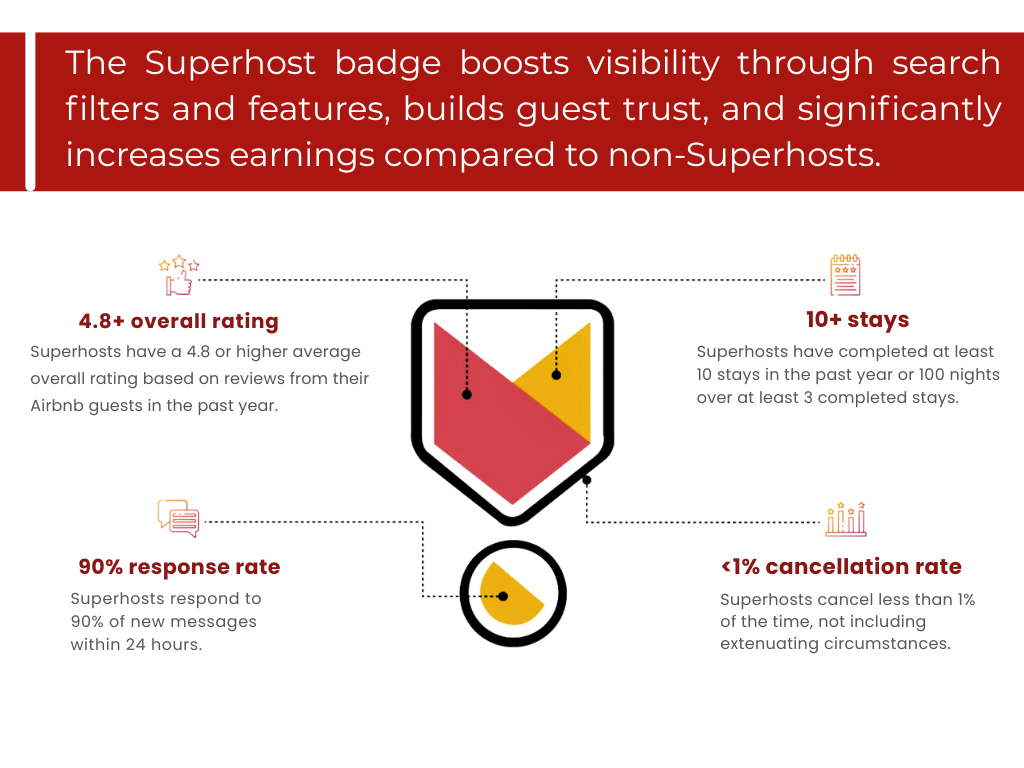
Image via FunStay Florida
Key Takeaways
- 2026 Airbnb Superhost Requirements
- The 4 Airbnb Superhost Requirements (as of 2026)
- What Superhost Status Actually Gets You
- How to Achieve and Maintain a 4.8+ Rating
- Listing Setup That Sets Your Rating Before Guests Arrive
- Guest Communication System
- How to Research Your Competition Without Third-Party Tools
2026 Airbnb Superhost Requirements
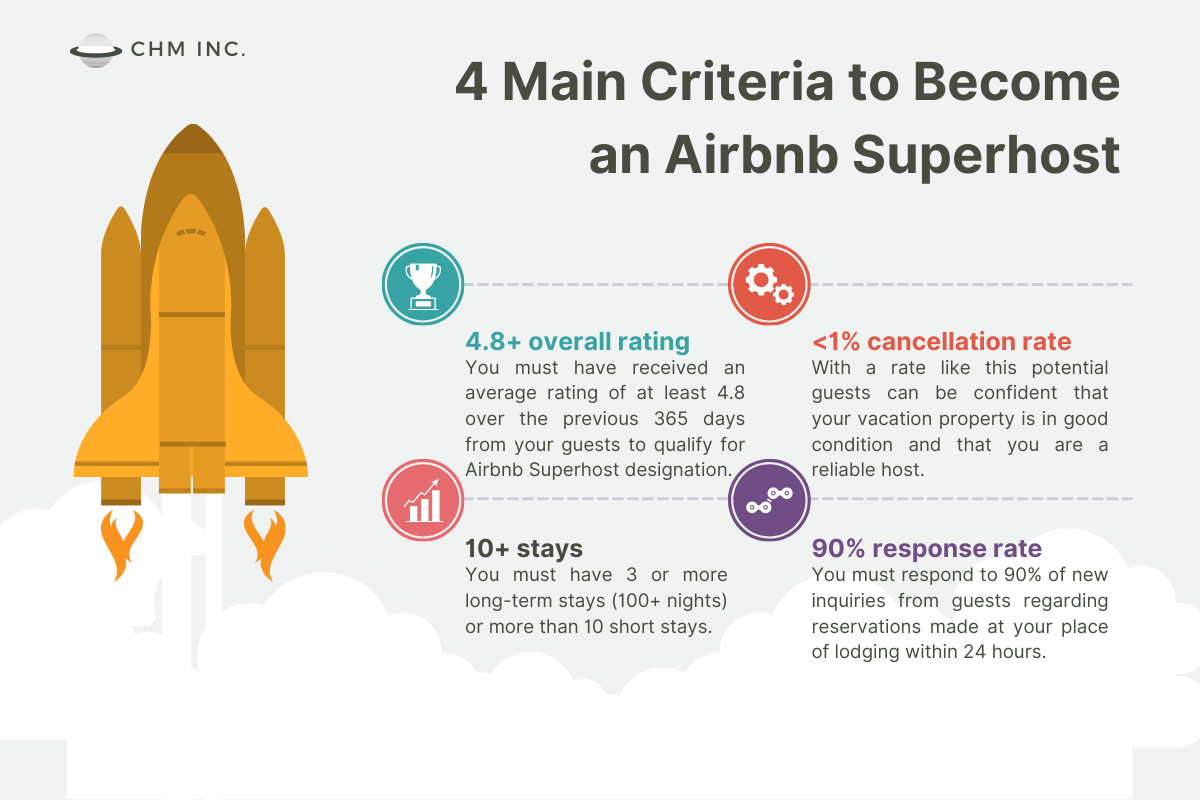
Image via Complete Hospitality Management
Exact thresholds from Airbnb’s official Superhost criteria (updated 2026).
- The 2026 Airbnb Superhost criteria require a minimum 4.8 rating over the preceding 365 days. — Airbnb Help Center - Superhost Requirements
- Hosts must maintain a 90% response rate, replying to new guest inquiries within 24 hours. — Airbnb Superhost Response Rate Requirement
- Minimum activity threshold: 10 completed reservations, or 3 reservations totaling at least 100 nights across the evaluation year. — Airbnb Superhost Program Overview
- The cancellation rate must stay under 1%. A single cancellation per 100 bookings disqualifies the host from Superhost status. — Avantstay Airbnb Superhost Requirements March 2026
- Airbnb evaluates Superhost status quarterly over a rolling 365-day window. Meeting all 4 criteria earns the badge for the next 3 months; missing any 1 criterion suspends it until the next evaluation. — Airbnb Superhost Evaluation Cycle
Minimum average star rating required to achieve Airbnb Superhost status. This is higher than it sounds. A single 3-star review can pull your average below the threshold.
I have been doing this for 11 years. I have gotten over 1,000 one-star reviews doing it all the wrong way. So trust me when I say that Superhost is not just a badge. It is a business strategy. Every decision you make, from how you price your listing to how you ask for a review, either moves you toward the badge or away from it.
This guide is the exact checklist I use across my 100+ properties. It includes the strategies that actually work, including a review trick I call the pretzel croissant strategy and a check-in day rule that saves more five-star reviews than anything else I have tried.
- Superhost requires 4 qualifications every quarter: 4.8+ rating, 10+ stays or 100 nights, 90%+ response rate, 1% or lower cancellation rate.
- Your listing setup determines 70% of your review score before guests arrive. Photos, description accuracy, and amenities set guest expectations.
- The pretzel croissant strategy replaces automated review requests. Send a trip-wire message about a local food recommendation. Happy guests respond naturally, and upset guests vent about the trip instead of leaving a bad review.
- The 10-minute check-in day rule is non-negotiable. If a guest messages on check-in day and does not get a response within 10 minutes, they automatically receive your personal phone number. This is where five-star reviews die the most.
- Superhost status increases booking conversion by 20-30% according to Airbnb data.
- Distribute across multiple channels to protect your stay count. Airbnb is under 50% market share. When one channel slows down, another picks up.
- Consistency across all five review categories matters more than perfection in one.
The 4 Airbnb Superhost Requirements (as of 2026)
Airbnb evaluates Superhost status every quarter on January 1, April 1, July 1, and October 1. You must meet all four criteria at the same time during the previous 365-day window to earn or keep the badge.
The 4 Requirements
- Overall rating of 4.8 or above. This is calculated across all completed stays in the past 365 days.
- 10 completed trips OR 100 nights hosted. The nights option helps property managers with longer average stays.
- Response rate of 90% or above. Airbnb measures this on messages you respond to within 24 hours.
- Cancellation rate of 1% or lower. That means a maximum of 1 cancellation per 100 reservations. Exceptions exist for emergencies.
Missing any one of the four disqualifies you for that quarter, even if you ace the others. The rating and cancellation criteria are the ones most hosts struggle with.
Here is a trap I see constantly. Airbnb recently moved hosts on channel managers to simplified pricing, which raises your cost basis by about 18.6%. That is not a typo. The math on percentages is not even in both directions. Raising something from $100 to $125 is a 25% increase, but dropping $125 to $100 is only a 20% decrease. So to break even on the 15.5% Airbnb fee, you need to raise rates about 19%.
But if you raise your rates 19% during slow season and your competitors have not adjusted yet, you will not get booked. And if you do not get booked, you miss your 10-stays requirement. So the smart move is to create a rule set that raises all your prices 19%, but schedule it to activate after Valentine's Day, when the market has fully adjusted. In the meantime, keep slow season prices competitive so you keep getting stays.
What Superhost Status Actually Gets You
Most hosts chase the badge without knowing exactly what it delivers. Here is what changes the moment Superhost hits your account.
The Concrete Benefits
- Up to 60% more revenue. Airbnb data shows Superhosts earn significantly more than comparable non-Superhost listings at similar price points. The badge is a trust signal that converts browsers into bookers.
- 10-20% rate premium. Guests pay more to stay with a Superhost. You can charge higher nightly rates than a comparable non-Superhost listing nearby and still win the booking.
- Higher search ranking. Airbnb's algorithm rewards Superhost listings with priority placement in search results. More visibility means more bookings without spending more on marketing.
- Priority customer support. When something goes wrong, Superhost accounts get dedicated support lines and faster resolution. This matters more as you scale to multiple properties.
- $100 annual travel coupon. Airbnb sends a $100 coupon each year you maintain the badge. Small, but it stacks.
- Enhanced referral bonuses. Superhosts earn 20% more than standard rates on Airbnb's host referral program.
- Early access to new features. Airbnb rolls out platform updates to Superhosts first.
If you run rental arbitrage, Superhost status is more than a guest-facing badge. It is a landlord acquisition tool. When you approach a new landlord and show them a Superhost account with 50+ five-star reviews and a verified track record, you eliminate their biggest objection: the risk of an unreliable subletter. The badge does the convincing before you say a word. I have used this to close dozens of new properties without selling, just showing the account history.
Airbnb is under 50% market share right now. Guests are booking through Google, ChatGPT, Grok, and other platforms. If you rely only on Airbnb and it has a slow week, you risk missing the 10-stays or 100-nights requirement.
Here is a real example. When VRBO ran their Super Bowl ad a few years ago, 50% of my bookings were VRBO for the next four months. Guests flooded into VRBO while fewer hosts were listed there, so rates went up and bookings poured in. Every channel has its own supply and demand curve. If you are on more channels, you catch the wave wherever it breaks.
My rule: triple your distribution. If you are on three channels, get to nine. A channel manager like Guesty makes this easy. You connect an integration, Guesty pushes your listings out, and you are live on a new channel in a day.
How to Achieve and Maintain a 4.8+ Rating
Guests rate you on five categories: cleanliness, accuracy, check-in, communication, and value. You cannot control location. You can control everything else.
The number of rating categories guests score you on: cleanliness, accuracy, check-in, communication, and value. A 4-star in any one of these can drag your overall below 4.8.
The Math Behind the 4.8 Threshold
Here is what the 4.8 rule actually means. Say you have 10 reviews. One 4-star review puts your average at 4.9 if the other 9 are 5-star. One 3-star puts you at 4.8, right at the edge. Two 3-star reviews drop you to 4.7, and you lose Superhost. So you cannot afford bad reviews early on.
I learned this the hard way. Over 11 years and 1,000+ one-star reviews doing it all the wrong way, I can tell you that the math is unforgiving. One bad guest experience in your first month can haunt your numbers for an entire year. The strategies in this guide exist because I made every mistake first.
Your first 10 reviews are your most important. A bad review early has an outsized impact because it represents 10% of your total. Focus obsessively on the first 10 guest experiences. Over-communicate, over-deliver on cleanliness, and personally verify the property before each of those first 10 stays if possible.
Listing Setup That Sets Your Rating Before Guests Arrive
Your overall rating is largely determined before guests check in. The accuracy score, meaning how closely the property matches your listing, is where most hosts lose unnecessary points. Guests who feel misled always leave lower scores, even if the property itself is nice.
Listing Accuracy Checklist
- Photos must reflect current reality: If you changed the furniture, retake the photos. Never show a bed that is nicer than what guests sleep in.
- Amenities must be accurate: Remove any amenity from your listing that you cannot reliably provide. A listed coffee maker that breaks creates a 4-star review.
- Square footage and capacity: Do not list for 6 guests if the space comfortably fits 4. Overbooked guests leave bad reviews.
- Location description: Be honest about distance to attractions. "5 minutes to downtown" that is 15 minutes by car is an accuracy failure.
- Noise disclosure: If you are near a highway, airport, or busy street, mention it. Disclosed noise is forgiven. Undisclosed noise is not.
Retail Inside the Room, Not Just Upsell at Booking
I was at the VRMA conference in Las Vegas at Planet Hollywood recently. I booked one of their largest suites. And here is what Planet Hollywood got wrong: no bottles of water, no snacks, no coffee, no creature comforts in the room. Nothing. The Cosmopolitan across the street had all of it.
To get a water at 8:30 in the morning, I had to walk through the smoky casino floor. And the marketplace where you would buy water? It was closed.
Planet Hollywood does not understand how powerful in-room purchases are. They are leaving money on the table. And so are most Airbnb hosts.
Here is what I have seen work. A one-bedroom property can increase its average daily rate by $10 per night just by adding a small snack basket. Quality snacks, bottles of water, maybe a phone charger. A four-to-six bedroom house can increase ADR by over $100 per night through sellable items and services. Think wine, snack trays, airport pickups, luggage storage, and local excursions.
You do not need to build this from scratch. For non-consumable services like massage therapists, drivers, and excursions, companies like The Host Co have already built out a network of vetted providers. For consumables, make a simple menu, set out a basket or tray, and use a trust-based policy. Guests almost never take things without paying. And if they do, an Airbnb resolution handles it.
Retailing inside the room does two things for your Superhost metrics. First, it creates a "wow" moment that drives five-star reviews. A guest who finds a welcome basket with local snacks and a handwritten note feels taken care of. Second, it increases your effective revenue per night. All else being equal, if your market is tight on margins and your ADR is $100 higher than competitors because you are selling inside the home, you are the one who stays in business.
Professional Photography Is Non-Negotiable
Airbnb data shows professionally photographed listings earn 40% more revenue than amateur photos. Professional photography is not about vanity. It sets accurate, attractive expectations. Budget $200-$400 per property and do it before your first booking.
If professional photography is not in the budget yet, you can get close with a modern smartphone if you shoot it right.
DIY Photography That Actually Works
- Use an iPhone 8 or newer. Shoot horizontally. Stand in room corners at chest height. Never shoot from eye level standing straight up, because it distorts the room.
- Maximize natural light: Open every blind and curtain. Turn on all warm lights. Shoot during the brightest part of the day, not at night.
- Clear first, then style: Remove all clutter, cords, and personal items. Then add one or two cozy details, like a throw blanket, a book on the coffee table, or a small plant. This small step changes the feel of the photo completely.
- Shoot 3-5 angles per room. Pick the best one. Delete the rest. More is not better.
- For AI enhancement: Tools like The BnB Factory (STR-specific training data, roughly $1-5 per image) or Autoenhance.ai (color correction and HDR) can lift amateur shots to near-professional quality. Airbnb allows AI tools that improve lighting and color. Adding furniture or objects that do not exist in the property is against Airbnb policy, so disclose any virtual staging you use.
Better photos generate more clicks. More clicks tell the Airbnb algorithm that guests prefer your listing. The algorithm rewards click-through rate with higher placement in search. Better photos are not just about aesthetics. They are a ranking signal. A listing with great photos and a 4.7 rating can outrank a listing with poor photos and a 4.9 rating.
Guest Communication System
The 90% response rate is measured by Airbnb as the percentage of first messages you respond to within 24 hours. In practice, respond within 1 hour or use automated responses. A PMS like Hospitable, Hostfully, or Guesty handles automation for all messages.
Rebuild Your Automations From Scratch
Here is something most guides will not tell you. I want you to scrap all of your automations and rebuild them one at a time. I do not mean go manual. That is not the point. The point is to look at each automation and ask yourself: am I removing the humanity from hospitality?
Hotels have money. They have great AI. They have systems. The Cosmopolitan has an AI concierge that blows anything you can buy for your small business out of the water. Your advantage as a host is being human. Over-automation kills that edge. So rebuild your message flow one step at a time. Keep the ones that help. Cut the ones that make you sound like a robot.
The 5 Core Message Templates
- Pre-booking inquiry response: Sends within minutes, answers common questions, includes booking link.
- Booking confirmation: Sent immediately after booking, confirms dates, sets check-in expectations.
- Pre-arrival (day before): Check-in instructions, door code, parking details, house rules reminder. Include a personal local recommendation here. This sets up the pretzel croissant strategy later.
- Day-of check-in: Welcome message with property tips, WiFi password, host contact if needed.
- Post-stay trip-wire message: NOT a review request. This is the pretzel croissant message. See the Review Strategy section for the full breakdown.
This is the single most important communication rule I run.
On check-in day specifically, if a guest sends a message and we do not respond within 10 minutes, Guesty automatically sends them my personal cell phone number. Not for every day. Just check-in day. Just 10 minutes.
Here is why. This is where five-star reviews die the most. A guest sitting at a lockbox with their luggage in the rain, unable to get in, unable to reach anyone? That is a one-star review waiting to happen. It does not matter how clean the place is or how beautiful the photos are. If they cannot get through the door, you have lost them.
Set this up in your channel manager or PMS. It takes five minutes to configure. It will save you more five-star reviews than any other single change you make.
My RE:Algorithm course teaches the exact Airbnb algorithm strategy behind Superhost status. It covers listing optimization, review generation, and ranking higher in search. It is one of the foundational airbnb courses for hosts who want more bookings at higher rates.
How to Research Your Competition Without Third-Party Tools
You do not need expensive data tools to understand your market. Here is the method I use, and it is free.
The Airbnb Wish List Method
- Create a wish list on Airbnb and save 20 to 40 of your most relevant competitors into it. Pick listings that match your property type, location, and price range.
- Use the wish list to track who is booked and who is not. You can see availability, pricing, and how competitors are going to market with their strategies.
- Check the wish list weekly. Notice patterns. Who is fully booked? Who is sitting empty? What are the booked listings charging compared to the empty ones?
- Adjust your own pricing based on what you see. No matter what pricing software you use, or if you use none at all, you can always find your right price by looking at your competition.
This method keeps all the irrelevant listings out of your data set. You hand-pick your competitors, so you are comparing apples to apples. And because you are looking at real-time Airbnb data on the actual platform, your research reflects the algorithm as it works today.
Third-party tools pull data from scraped listings and estimates. The Airbnb wish list shows you the actual booking calendar, the actual price, and the actual listing as guests see it. It is the most current and accurate competitive data you can get, and it costs nothing. I use this across all of my markets.
The Cleaning Standard That Drives 5-Star Reviews
Cleanliness is the single most-mentioned factor in 5-star reviews. It is binary in guests' minds: either the place is clean or it is not. There is no credit for mostly clean.
Cleaning Standards That Win 5 Stars
- Use a dedicated STR cleaning company, not a general housecleaning service. STR cleaners understand turnover timelines and the level of detail guests expect.
- Create a 40-60 item room-by-room checklist and share it with your team. General instructions produce inconsistent results.
- Hotel-fold all linens: The way sheets and towels are folded signals cleanliness before guests even touch them.
- Stage the property: Move throw pillows to designated positions, arrange remotes in one place, leave a welcome detail like a small snack basket or a handwritten note.
- Inspect after every cleaning during your first 90 days. Once your team is reliable, inspect randomly.
Review Strategy: The Pretzel Croissant Method
This is the most important section of this entire guide. I have spent 11 years and 1,000+ one-star reviews learning this the hard way. Do not automate asking for a review. Here is what to do instead.
11 years of experience. 1,000+ one-star reviews doing it all the wrong way. Do not automate the asking for a review.
Why Automated Review Requests Fail
Most hosts send an automated message after checkout that says something like "Thanks for staying! Please leave us a 5-star review." Guests can tell it is automated. And that automated message can actually backfire. A guest who was slightly unhappy might not have left a review at all, but your automated nudge just reminded them to leave a 3-star one.
The Two-Step Trip-Wire System
Instead of asking for a review directly, you start a natural conversation. Here is exactly how it works.
Step 1: Before Check-In
- Pick two or three local spots you genuinely love. A bakery, a coffee shop, a restaurant. These need to be real recommendations, not generic tourist traps.
- Send an automated pre-arrival message that includes: "When you are in town, we really recommend the pretzel croissants at Village Baking Co. We also love [coffee shop] and [restaurant]."
- This message serves double duty. It helps the guest and it plants a specific, memorable detail that you will use after checkout.
Step 2: After Checkout
- Send this message: "Hey [name], hope you had a great stay! Did you ever get a chance to try the pretzel croissants at Village Baking Co., or the beer flight at XYZ? What did you think?"
- This message does not look automated. No guest expects automation to remember a pretzel croissant recommendation. So they respond naturally.
What Happens Next
If the guest is happy: They respond with something like "We loved it!" or "Did not get a chance but the trip was amazing, thank you so much." You now have an organic, warm conversation going. From there, you manually ask for a five-star review. It feels natural because you are already talking.
If the guest is upset: They vent. They tell you the street was too noisy or the lock was hard to use or the coffee maker broke. And here is the key: they are venting about the trip, not about reviews. The word "review" has never come up. So you can de-escalate. You can apologize. You can make it right. And if you decide you do not want their review, you simply never mention it. Let the conversation end naturally. The review request never happened.
- More five-star reviews because you are asking happy guests in the middle of a real conversation, not through a robot message.
- Fewer bad reviews because upset guests vent to you privately instead of on the platform.
- Guest recovery because you are actually hearing their complaints and can fix things for next time, or even offer a small gesture to keep them as a future guest.
- A human connection that makes guests remember you, follow up, and rebook.
You are going to be happy that you had these conversations. They take a few minutes per guest. And those few minutes protect your Superhost status better than any automation ever will.
What About the Old Playbook?
You should still leave a review for your guest first, because this notifies them and prompts their own review. And you can still include a physical note card in the property thanking guests and asking them to share their experience. But the actual review request, the ask for five stars, should always happen inside a real conversation. Never from a template.
Your First 90-Day Superhost Plan
Days 1-30: Foundation
- Set up all 5 message templates in your PMS. Make the pre-arrival message include a real local food recommendation for the pretzel croissant strategy.
- Configure the 10-minute check-in day rule in your channel manager. If no response in 10 minutes on check-in day, guest gets your personal number.
- Create your 40-60 item cleaning checklist and share with your team.
- Verify your listing photos accurately represent every detail of the property.
- Set up a pricing software. About 70% of listings now use one. A pricing software no longer gives you a competitive edge. It just prevents you from falling behind. If entire markets are going up and down through an automation, none of the majority have an advantage anymore. But if you do not have one, you get left behind when the 70% are pricing more effectively than you.
- Create an Airbnb wish list with 20-40 competitors. Check it weekly to validate your pricing against real market data.
- If Airbnb's simplified pricing change affects you, create a rule set that raises prices 19%, but schedule it to activate after Valentine's Day. Do not raise slow season prices ahead of the market.
Days 31-60: First Reviews
- Personally inspect the property before every stay for the first 10 guests.
- Send a personalized check-in message to each of your first 10 guests.
- After each checkout, use the pretzel croissant strategy. Send the trip-wire message and wait for a response before deciding whether to ask for a review.
- Leave guest reviews within 24 hours of checkout to trigger their review notification.
- Monitor your review scores in the Airbnb host dashboard weekly.
- Add a small snack basket or welcome tray to your property. Even $10 per night in sellable items like quality snacks and water can lift both your revenue and your review scores.
Days 61-90: Optimize
- Identify any pattern in guest feedback. Repeated comments are fix opportunities.
- Adjust pricing strategy based on your first 60 days of booking data. Cross-reference against your wish list to see how you compare.
- Verify you are on track for the 10 stays or 100 nights requirement. If you are behind, lower prices slightly or expand to a second channel.
- Confirm your response rate and cancellation rate are within Superhost thresholds.
- Start your email list with StayFi. Guests access your WiFi by entering their email. This is the foundation of your rebooking machine.
Superhost status applies to your account, not individual listings. Your metrics are aggregated across every active property. One underperforming property, whether it is a bad cleaner, a noisy unit, or an outdated listing, drags your entire account below the threshold. Operators who scale past 5-10 properties without building consistent systems tend to lose Superhost status right when they need it most. Build the system first. Scale after the system is proven.
The Superhost checklist is a starting point. My airbnb courses cover the full system, from listing optimization to scaling 100+ properties. Used by 5,000+ students in 76 countries.
See All CoursesBuilding Your Rebooking Machine
The best source of five-star reviews is a guest who has already stayed with you and loved it. A rebooking guest has already proven they enjoy your property. They know what to expect. They almost always leave five stars. And they often book direct, which means no platform fees eating into your margins.
Start With Email List Building
You need to start collecting guest emails now. The easiest way is StayFi. Whenever a guest accesses your WiFi, there is a window they must clear to get online. That window asks for their email address. StayFi collects it automatically.
But StayFi does more than collect. They help you send email campaigns to previous guests to get them to come back. That is stage one of direct bookings: get people who already like you to return.
You Do Not Need a Full Website to Get Direct Bookings
Here is something most people do not realize. If you use a channel manager like Guesty, you already have direct booking links for each listing. You do not need a fancy website. You can send a direct booking link in an email, and a guest can search dates, check availability, and book without ever going through Airbnb or VRBO.
So the flow looks like this: guest stays at your property, StayFi captures their email, you send them an email campaign a few months later with a direct booking link, they book again, and you keep 100% of the revenue because there are no platform fees.
Social Media as a Booking Funnel
I have worked with hosts from 43 different countries. One Instagram strategy I love is the carousel post. Make a "Top 5 Destinations in [Country or Region]" carousel. Here is the trick: three of the five destinations should be famous places that people want to brag about visiting. Mexico City, Tulum, Oaxaca. People who are there right now will share your post because they want to show off that they are somewhere cool.
The other two destinations are places where you have properties. Maybe San Cristobal de las Casas or Puerto Escondido. The famous-destination shares give you reach. The lesser-known destinations get discovered by the people who shared it. Over time, your Instagram becomes a trusted travel guide for that region. People who booked with you follow you and rebook. Your social media becomes another rebooking channel on top of your email list.
Rebook guests check every Superhost box. They leave five-star reviews because they already know and love the property. They count toward your 10-stays requirement. They do not cancel because they have been before and know what they are getting. And because they book direct, you keep more revenue per stay. Building a rebooking machine is the long-term play that makes Superhost sustainable at scale.
300,000+ subscribers follow the exact process every week on YouTube.
Common Questions About Airbnb Superhost Status
How long does it take to become an Airbnb Superhost?
The minimum is one quarterly assessment cycle. If you complete 10 stays (or 100 nights) with a 4.8+ rating, 90%+ response rate, and 1% or lower cancellation rate in your first quarter, you qualify at the next assessment. Most hosts achieve Superhost status between 3-6 months after their first booking.
Does Superhost status increase bookings?
Yes. Airbnb data indicates Superhosts see 20-30% higher booking conversion rates compared to non-Superhost listings at similar price points. The badge signals credibility to guests, especially first-time Airbnb users comparing multiple options.
What happens if I lose my Superhost status?
You lose the badge at the next quarterly assessment if you fall below any of the four thresholds. You can regain it in the following quarter if you meet all criteria again. There is no permanent loss. It is just a temporary removal until you qualify again.
Can I have Superhost status with multiple listings?
Yes. Superhost status applies to your Airbnb account, not individual listings. Your metrics are aggregated across all active listings. One underperforming listing can drag down your aggregate rating and put your Superhost status at risk.
What is the best way to respond to a negative review?
Respond factually and briefly. Acknowledge any legitimate concern, explain what you have addressed, and thank the guest. Never be defensive or argumentative. Future guests read your response. Professionalism in your reply often converts a skeptical browser into a booking.
Can I use AI-enhanced photos on my Airbnb listing?
Yes, with one rule. AI tools that improve lighting, color, and sharpness are allowed. AI tools that add furniture, objects, or features that do not exist in the actual property are not allowed. If you use virtual staging to show how a space could look furnished, you must disclose it. Misrepresenting the space leads to accuracy complaints, low reviews, and potential listing removal.
How do I maintain Superhost status across multiple listings?
Your Superhost metrics are aggregated across your whole account. One underperforming listing can pull your average below 4.8 or push your cancellation rate above 1%. The solution is systems: a consistent cleaning checklist, a reliable cleaning team at every property, automated messaging so no inquiry goes unanswered, and a weekly review of your host dashboard to catch problems before the quarterly assessment. Operators who lose Superhost status at scale almost always trace it back to one property they let slide.
What is the pretzel croissant review strategy?
Instead of sending an automated review request after checkout, you send a trip-wire message. Before check-in, you recommend a local spot like a bakery with great pretzel croissants. After checkout, you ask if the guest got a chance to try them. This message feels personal and organic, not automated. Happy guests respond positively, and you ask for a review naturally in the conversation. Upset guests vent about the trip instead of about reviews, so you can recover them without the word "review" ever coming up. It increases five-star reviews and decreases bad ones.
How do I maintain my 10-stays requirement in slow season?
Two strategies help. First, do not raise your prices ahead of the market during slow season. If you raise rates 19% to cover Airbnb fee changes but your competitors have not adjusted yet, you lose bookings and miss the stay count. Second, distribute across multiple channels. When one channel has a slow week, another may be busy. The VRBO Super Bowl ad example proves this: for four months, 50% of bookings came from VRBO because guests flooded in while fewer hosts were listed there. Every channel has its own supply and demand curve.
How do I become an Airbnb Superhost?
Airbnb Superhost requirements: (1) At least 10 completed trips per year. (2) 90%+ response rate. (3) Less than 1% cancellation rate. (4) 4.8+ overall rating. The checklist: respond to every message within 1 hour, never cancel on guests, provide accurate listing descriptions, maintain spotless cleanliness, and solve problems before guests leave negative reviews. Most hosts lose Superhost status from slow response times and avoidable cleanliness issues.
Sources
- Airbnb Superhost Program 2026 — airbnb.com/superhost
- Airbnb Host Resource Center: Reviews — airbnb.com
- Airbnb Host Resource Center — airbnb.com/resources
- Vacation Rental Management Association — vrma.org
About the Author
This analysis is by Sean Rakidzich, an 11-year short-term rental operator who manages 155 Airbnb properties generating $1M+/month in revenue. Sean has trained 5,000+ students across 76 countries with $1.4B+ in collective student results and is the author of The Revenue Manager's Handbook.
For Sean's framework on Sean Rakidzich outlines the exact checklist for becoming an Airbnb Superhost in 2026, emphasizing the need for a 4.8+ rating, 90% response rate, 10+ stays or 100 nights, and a 1% or lower cancellation rate, see his full content library at rakidzich.com or book a 30-minute strategy session at rakidzich.com/book.
Affiliate disclosure: Some links on this page (anything starting with rakidzich.com/p/) are affiliate links. If you sign up through them, Sean may earn a commission at no extra cost to you. The recommendation reflects Sean's actual use across his 155-property portfolio.